 Orders ship from the USA, Orders of $25 or more qualify for FREE Shipping in the USA
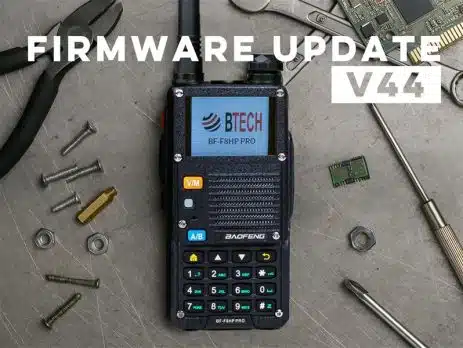
BTECH Launches Firmware V0.44 for BF-F8HP PRO – Packed with Smart Enhancements and User-Friendly Fixes
Wednesday, April 16, 2025
ARLINGTON, SD – BTECH continues its commitment to innovation and user experience with the launch of an exciting new firmware update, V0.44, for the widely acclaimed BF-F8HP PRO handheld radio. Designed with extensive user feedback and practical field use in mind, this upgrade introduces significant improvements, intuitive enhancements, and crucial fixes that ensure your radio operates at peak performance. No matter how you use the BF-F8HP PRO firmware V0.44 delivers enhanced usability and versatility. Below you’ll find a detailed rundown of what’s new and how it benefits you!
New Features:
Revolutionary Linked Zone Scanning
One of the biggest upgrades is Linked Zones scanning—a highly requested feature! Now you can scan multiple zones at once, broadening your monitoring capabilities significantly. Select your zones via Menu > Scan > Scan Zones and turn on Link Zones to easily manage complex scanning setups.
Dual Watch Gets More Intuitive
Firmware V0.44 makes Dual Watch mode easier to use by clearly showing which channel (A or B) you’re set to transmit on with a new antenna icon. Outdoor enthusiasts, in particular, will appreciate this clear visual indication, eliminating any guesswork in bright environments.
Streamlined Channel Programming
Gone are the days of saving channel names first, then revisiting to save additional settings. Firmware V0.44 simplifies this process dramatically—now, when programming a new channel directly from your keypad, all changes take effect immediately. It’s quicker, simpler, and less prone to mistakes.
Customizable Side Key Controls
To prevent accidental key presses, you now have the flexibility to disable side keys (SK1, SK2, PTT). This is great if you use a radio case, or if you’re configuring the radio for less experienced users. Easily adjust these settings from the Radio Function menu in CPS.
Firmware Improvements:
Accurate Power-On Display Timing
Ever noticed the power-on screen hanging around longer than it should? That issue is now history. Firmware V0.44 corrects the display timing, perfectly aligning the duration with your set preference, ensuring your radio boots exactly as expected every time.
Enhanced Elevation Reporting in Feet
For users preferring imperial units, elevation reporting now displays in feet when GPS Units are set to MPH—aligning with familiar measurements for quicker interpretation.
Aircraft Band Scan Preservation
If you’re scanning frequencies in the aircraft bands, you’ll be pleased to know that your selected scan range is now reliably preserved—even after restarting the radio. This ensures a seamless and uninterrupted monitoring experience.
Enhanced GPS Speed Reporting
Previously, you might have seen a confusing 1.24 MPH speed indication before a GPS lock was acquired. The new firmware eliminates this oddity, giving you more precise speed reporting. Remember, for optimal accuracy, keep a steady pace in one direction.
Clearer GPS Status Indicators
When switching between Radio IDs, GPS coordinates, or distance views, you’ll no longer experience the GPS indicator disappearing momentarily. This refinement makes checking your status straightforward and uninterrupted.
Improved GPS Display
You’ll now see how many satellites your BF-F8HP PRO is tracking directly on the GPS screen. This addition gives immediate insight into the accuracy of your position, elevation, and speed data.
The full firmware release notes are included in the V.44 download below
Experience the BF-F8HP PRO Advantage
Thinking of upgrading your gear? Now’s the perfect moment to explore the BF-F8HP PRO’s advanced capabilities—GPS integration, Linked Zone scanning, customizable keys, and improved reliability ensure your radio communications are ready for any challenge.
How to Update Your Firmware
Important Warning for Firmware Updates
This update is only for the BF-F8HP PRO radios. Attempting to apply this firmware update to other models—such as the UV-17 Pro GPS or other non-BTECH models—will result in a bricked or malfunctioning device.
Note: If you accidentally attempt to update a non-compatible device, it may permanently damage or “soft-brick” the radio. For BF-F8HP PRO users, if any issues occur during the update process, performing a firmware flash with the correct V0.44 firmware should resolve them.
To download the firmware update for the BF-F8HP PRO, visit the official BF-F8HP PRO product page and navigate to the Firmware Update, CPS, and Manual tab. Here, you’ll find the BF-F8HP PRO V.44 Firmware Update Bundle with the latest firmware file, CPS programming software, and user manual.

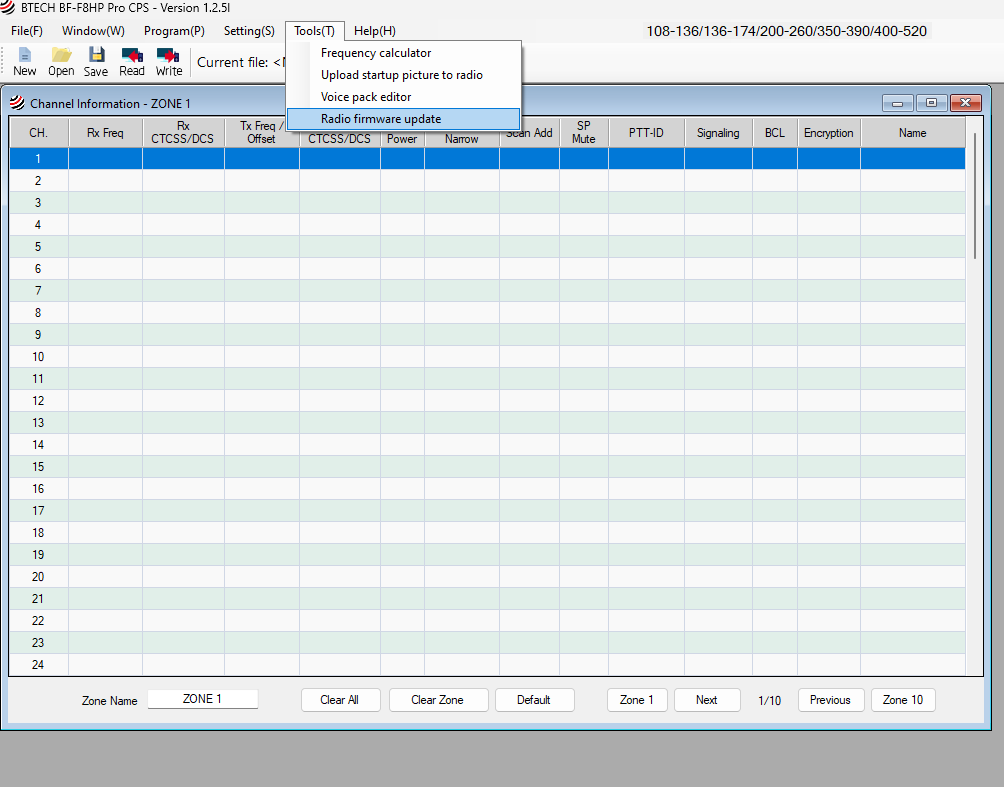
Step 1: Open CPS Software and Access Firmware Update Tool
- Open the BTECH BF-F8HP PRO CPS software on your computer.
- In the top menu bar, select Tools (T).
- From the dropdown menu, choose Radio firmware update.
Step 2: Connect Your Radio and Enter Bootloader Mode
- Use a PC03 programming cable to connect your BF-F8HP PRO radio to your computer.
- Place the radio in bootloader mode:
- Turn off the radio.
- While holding down both side keys, turn the radio back on.
- The radio screen will remain blank, and the green Rx LED will light up, indicating that it is in bootloader mode.
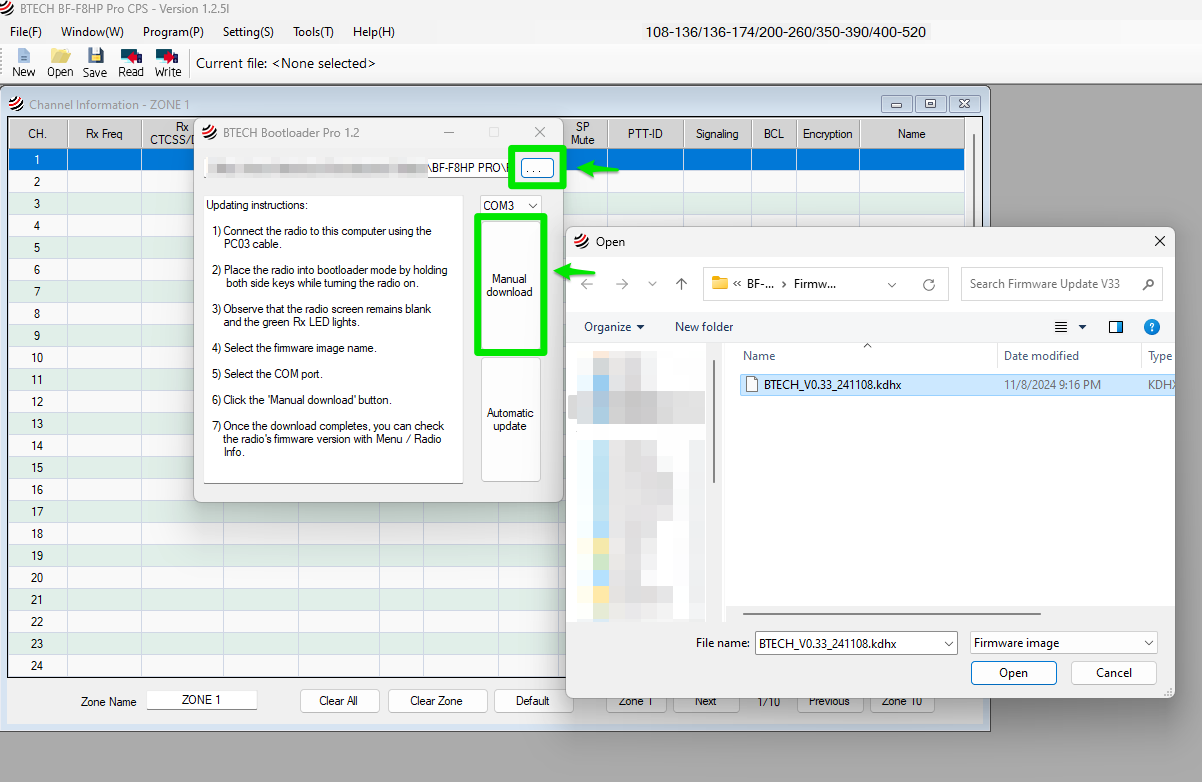
Step 3: Select Firmware File and COM Port
- In the Bootloader window, click the … (browse) button to locate the firmware file.
- A file selection window will appear. Navigate to the folder where you saved the firmware file (e.g., BTECH_V0.44_250409.kdhx), select it, and click Open.
- Select the COM port that corresponds to your connected radio.
Step 4: Start the Firmware Update
- With the correct firmware file and COM port selected, click the Manual download button to start the update process.
- The firmware will be downloaded to the radio. Wait until the process completes.
Step 5: Verify Firmware Update
- Once the update is complete, disconnect the radio from the computer.
- Power on the radio, then check the firmware version:
- Go to Menu > Radio Info to confirm that the firmware has been successfully updated to the new version.
Your BF-F8HP PRO is now updated with the latest firmware.
Your Feedback Shapes the Future
We thrive on your input. Let us know your thoughts on firmware V0.44, suggest improvements, or share your favorite features. Your voice helps us continuously enhance our radios!
Why Choose BTECH?
At BTECH, we’re dedicated to ongoing innovation and robust support for our products. Our firmware updates mean your BF-F8HP PRO stays ahead, packed with the latest radio technology. Thank you for being part of our growing BTECH community. Update now and see the difference Firmware V0.44 makes!
About BTECH
BTECH is a leader in two-way radio innovation for amateurs, professionals, and emergency services. We focus on solid performance, practical features, and a user-friendly experience. For more information, visit www.baofengtech.com or contact us at [email protected]
Thank you for being part of the BTECH community. Stay informed, stay connected, and enjoy everything Firmware V.44 has to offer.
















Comments (18)
I notice that the bug of the 220 ham band transmit being disabled in Part 97 mode has been fixed.
I really appreciate the firmware upgrade, especially the updates to the GPS altitude (feet) and dual watch notification.
But unable to scan channels now, I use to just hole the # key
Ensure you have you zone linking setup how you want (this is a new feature and your zones might not be selected)
Good radio Good Update and good Customer service.
My new BF-F8HP-PRO will not scan channels. I have my channels in a single zone. Frequency scan works fine. Have you any advise?
Reach out to [email protected] to review your configuration files as this would be a configuration issue
How do you download the new firmware on a MAC Computer
We use MacOS at BTECH – but when running updates, we will use Parallels or Windows emulators.
How about adding weather alert feature like ailunce and uniden
I usually backup the current configuration of a file system before upgrading to provide a recovery point. The backup should contain all the settings for the radio (for instance repeater configurations).
The instructions don’t appear to provide some copy of the current configuration before upgrading.
Am I missing something?
If you download an image from the radio in CPS or in CHIRP that is your ‘backup’
Great transceiver for the price.
Upgraded to 0.44 firmware.
Added 200 channels using the CP loader with PC03 USB cable with no issue.
Ordered a tri- band antenna to improve weak channels.
Would recommend the inexpensive solid device
BF-F8HP-PRO can not do firmware update Firmware V0.44 for BF-F8HP PRO when I get to the screen to select file and click manual start it can not handshake with hand held
I’m having the same issue. Radio is in bootloader mode, firmware and com port selected, but when I start the manual upload it gets stuck on Handshake indefinitely. Any suggestions here?
Hi there . I have the BF F8HP PRO and I was wondering what the search buttton is for. I know it can search VHF, UHF, and some others , but how many frequencies is it scanning in each respective like VHF, UHF, the 200 and 300 frequency, I thank you for your time. Respectfully, David Hammell
The BF-F8HP Pro is so close to being a perfect compact HT. I also have a UV-5RH Pro/Plus GPS that is similar in features. I got one of each to test and see which is more complete before purchasing more to create a set of 6-10 units. The F8HP is a bit cleaner in the RF and the quality control is tighter along with a slightly more square form factor that fits in the hand more solidly. Both use the same batteries and have almost identical layouts. The F8HP does have the screwed on “faceplate” that seems to be mostly cosmetic, but does give a nicer look to the device.
Both devices have the almost useless, totally ugly volume knob that sticks up too high and has no easily identifiable position marker. A simple black knob with embedded arrow or line and filled with white (or glow-in-the-dark) paint would do so much better. I swapped the black, slim knobs from a set of UV-5G Plus radios and cut a groove into the knobs with a Dremel, then filled with glo-paint to create more usable knobs.
I don’t use the GPS functionality on either unit, but they don’t talk to each other anyways. The 5RH Pro does have less static on transmit, at least my copy does. I don’t use any of the antennas that come with the units and have dedicated Smiley 5/8 antennas so both radios show an SWR of around 1.05-1.10. Both radios do show 10W output, but the 5RH Pro does go to 11W at times.
With that all said, the 5RH Pro does have a more mature firmware (as of the 0.44 that the F8HP has). These are things that the BTech developers could add to the F8HP with a day’s worth of work and it would make it the more premium option.
The needed changes/additions? Here they are:
– Add a SK1/SK2 LONG customization. There is nothing more annoying than the useless “alarm” on these. And SK1 Long is currently hard-coded to that alarm so it constantly gets triggered because I have other radios programmed for SK1 Long to a different function. The 5RH Pro has long customization and it works flawlessly to make for a good “one-handed” operation.
– The SK1/SK2 Disable is pretty useless too. If there’s no customization for the Long press, then add SK1/SK2 *LONG* press disable only so we can get rid of that stupid alarm that you always accidentally trigger.
– Alternatively, an “OFF” selection for the Alarm would also be useable.
– Adjustable brightness. The 5RH Pro has 5 levels of brightness in addition to the backlight timeout. There’s no real need for 5 levels, a simple “bright” and “dim” would work great. Nothing like the radio turning on in the dark (while driving or hiking) and being blasted with that bright screen to destroy your night vision. This could even be mappable to the SK1/SK2 button to quickly toggle the 2 settings.
– SK1/SK2 “zone” currently just opens up the Zone selection screen on the F8HP. The 5RH Pro selects the next zone when the SK is pressed. The selection screen is counterintuitive as you’d use one finger on the side of the radio to click, then have to use a different finger to arrow up/down select, and finally move that finger to find the OK button. The 5RH Pro could easily be programmed for SK short (Zone “next”) and SK long (“Scan”) – creating a one-handed operation without having to look at the radio and/or fumble for the keypad.
– Dual-scan display mode “Name+Freq”. The 5RH Pro definitely has the nicer option here where even in dual scan mode, you can quickly see Zone, channel, name, AND frequency all in one. Zone and channel can stay where they are on the F8HP, just move the name up slightly, and in a smaller font, show the frequency below.
– On-screen volume display. The 5RH Pro uses the upper (“A”) bargraph for squelch to show volume and the bottom (“B”) bargraph for squelch. With the useless volume knobs, one can quickly see what the volume level is without turning the knob up/down and back or feeling the knob for the groove I cut. Another method that might work well is to have a temporary popup bargraph when the knob is adjusted, which goes back to the squelch bar after a few seconds.
– Boot screen time. The F8HP’s 3s min for boot picture is still too long. It needs a 1s setting. The 5RH Pro boots up much quicker while still showing that boot pic to please those gearhead sad-hams.
– Longer names and/or Zones. The 5RH Pro allows for longer channel AND zone names to be displayed. This is nice and doesn’t require coming up with whacky, brain-numbing abbreviations when creating channel lists. However, the F8HP allows some ASCII chars to display properly, so that does allow for some shortening of names. The 5RH Pro is missing these chars in the character set, so it’ll display a ‘?’ instead.
– Removable mic/speaker cover flap. Both radios have the annoying rubber flap that covers the side jackpack. When a K1 style plug is in, the flap stick out the side and gets caught on things. These aren’t waterproof anyways, so why not make a cover that slides down into the case or at least can be unscrewed?
Other than that cover issue, the firmware tweaks shouldn’t take long and would make the F8HP the perfect HT!
Any idea when the next firmware, v49, is coming out for release with the new fixes?