 Orders ship from the USA, Orders of $25 or more qualify for FREE Shipping in the USA
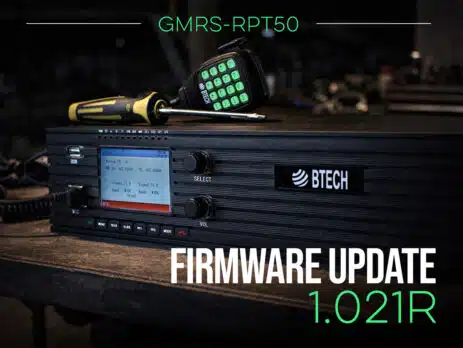
GMRS-RPT50 Firmware V1.021R Now Available: Reverse CTCSS for Cleaner Dropouts, Faster On-Site Setup
Tuesday, February 10, 2026
ARLINGTON, SD – BTECH today announced the release of Firmware V1.021R for the GMRS-RPT50, delivering a major refinement to on-air behavior and day-to-day usability. The update is led by a new Reverse CTCSS (Reverse Burst TX) option designed to reduce squelch tail noise at the end of transmissions, along with a reorganized front-panel menu system, improved on-screen feedback, and a redesigned CPS programming experience.
Repeaters should sound clean and set up fast. Firmware V1.021R focuses on the moments that matter: how transmissions end, how quickly you can find the right setting at the site, and how confidently you can verify your configuration.
Reverse CTCSS: a cleaner ending to every transmission
On many systems, the end of a transmission is followed by a brief burst of noise, often called a squelch tail, as receiving radios transition from open back to closed. V1.021R introduces Reverse Burst TX (ON/OFF), a Reverse CTCSS feature that can help many radios close squelch more quickly and smoothly.
When enabled, the GMRS-RPT50 transmits normal CTCSS during operation, then just before transmit drops briefly sends a phase-reversed CTCSS signal. That short reversal acts like a release cue that many radios detect immediately, allowing them to close squelch cleanly instead of lingering long enough to pass tail noise. The result is a more professional-sounding system that is especially noticeable in mobile environments and during frequent key-ups.
Because radio models handle tone drop differently, Reverse Burst is implemented as a simple ON/OFF option, so operators can enable it where it delivers a cleaner finish and disable it where it does not. On some handhelds, you may also need to adjust the radio’s repeater tail or squelch tail elimination setting (enable or disable) to get the best result.
Rebuilt menus for faster front-panel control
V1.021R also delivers a fully reorganized front-panel menu structure, rebuilt into clearer groups with cleaner sub-menus. The goal is to reduce time spent scrolling and searching, and make common setup and adjustment tasks feel more direct, especially when you are standing at the rack or tower site and need to move quickly.
CW ID level control and clearer transmit feedback
For system operators who want tighter control over their station identification experience, V1.021R adds CW (Morse) ID level adjustment, allowing the ID audio level to be matched to site preferences. The update also adds TX power indication on the display per channel, making it easier to confirm high/low behavior at a glance without connecting to software.
A redesigned CPS workflow built for clean starts
Programming workflows matter most when you are building from scratch or recovering from a reset. With V1.021R, the CPS has been redesigned for a more straightforward programming flow. The firmware package also includes a blank codeplug in the ZIP, ideal for creating clean, known-good configurations after a factory reset or when deploying standardized builds across multiple units.
Verified timer accuracy for real-world reliability
V1.021R validates timing where it counts. The ID timer and TX Time-Out Timer (TOT) have been verified for accuracy, helping ensure consistent behavior in the field.
Availability
Firmware V1.021R for the BTECH GMRS-RPT50 is available now.
Experience the GMRS-RPT50 Advantage
Building a cleaner, more dependable GMRS setup? The GMRS-RPT50 is designed for real repeater use, with rack-ready operation, flexible programming, and a firmware roadmap that keeps improving the experience over time. With features like Reverse CTCSS support, refined on-device menus, and a redesigned CPS workflow, it is a great time to upgrade your site.
How to Update Your Firmware
Important Warning for Firmware Updates
Note: During the update, do not disconnect power or USB. Interrupting the firmware write can corrupt the install. If you run into issues, re-enter Firmware Update Mode and re-run the update using the correct 1.021R firmware file.
To get the GMRS-RPT50 Firmware 1.021R Update Bundle, click the Download Firmware V1.021R button above. The bundle includes the 1.021R firmware file, the IAP programming tool, and the updated CPS.
Step 1: Extract the Firmware Bundle and Install the IAP Programmer Tool
- Download the GMRS-RPT50 Firmware 1.021R update bundle and extract the ZIP to a folder on your computer.
- Inside the extracted folder, locate and run: IAP(setup).exe
- Follow the prompts to install the IAP Programmer Tool.
- Launch the IAP Programmer Tool from your Start Menu/Desktop.
Step 2: Put the GMRS-RPT50 into Firmware Update Mode
- Power OFF the GMRS-RPT50.
- Press and hold the Green Key while powering the repeater ON.
- If done correctly, the LCD remains OFF (blank display).
- Connect the repeater’s front USB port to your PC using a USB-A to USB-A cable.
Step 3: Select the Correct COM Port
- In the IAP tool, click Seek-Com to detect available ports.
- Select the COM port that matches the connected GMRS-RPT50.
Step 4: Load the 1.021R Firmware File
- Click Open APP File.
- Select the 1.021R firmware .bin file included in the update bundle.
Step 5: Start the Firmware Update
- Click IAP to begin.
- The tool will write the firmware in blocks. Do not disconnect power or USB during this process.
- Wait until the IAP tool confirms the update is complete.
Step 6: Close the Tool and Reboot the Repeater
- Click Close in the IAP tool (safe disconnect).
- Unplug the USB cable.
- Power the repeater OFF, then power it ON normally.
- The repeater should now boot on Firmware 1.021R.
Step 7: Program Using the New CPS
- Install and open the new CPS included in the ZIP.
- Choose one of the following:
- Read from the repeater and save your updated configuration, or
- Load the included blank codeplug to build a clean configuration from scratch (especially useful after a factory reset).
- Note: The front-panel menu order has been updated to match the new organization, so setup and verification at the repeater is faster.
Finished!
That’s it. Your BTECH GMRS-RPT50 is now fully updated to Firmware 1.021R.















Leave a Reply