
 Orders ship from the USA, Orders of $25 or more qualify for FREE Shipping in the USA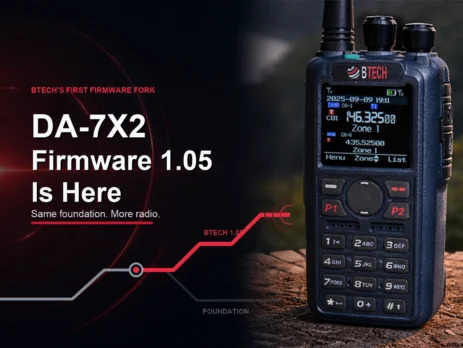
DA-7X2 Firmware V1.05 Is Here: More Features, Built the BTECH Way
Saturday, August 22, 2026 — Arlington, South Dakota
Many firmware updates are easy to ignore. V1.05 is not one of them.
With this update, one handheld can record and replay an analog FM or DMR simplex call. Several scan groups can work together. One or two priority channels can stay near the front of a long scan. A temporary talkgroup can remain selected until you clear it. Analog squelch can sit on a side key instead of behind a menu.
V1.05 is also the first official BTECH-developed firmware fork for the DA-7X2. If you have ever wondered what BTECH adds after the sale, this release is a clear answer: the radio already in your hand gains useful tools, matching programming software, a guided update package, and support from the U.S. team responsible for the fork.
The public release is DA-7X2 Firmware V1.05. The radio reports main firmware build V1.05d2, and the matching Customer Programming Software is BTECH CPS V1.05d.
On this page
1. Use one simplex channel as a portable voice relay
Store-and-Forward is the biggest change in V1.05.
The DA-7X2 listens to a complete analog FM or DMR call, saves the audio, and transmits it after the caller releases PTT. You speak, let go, and then the radio repeats the message.
That delay is what makes same-channel relaying possible. The DA-7X2 receives first and transmits second, so it can use one selected simplex channel instead of a VHF/UHF channel pair.
Picture two stations separated by a building, terrain, or another weak-signal pocket. They may not hear each other directly, but both may reach a DA-7X2 placed temporarily where it has a clearer RF path. The first station sends a short message. The DA-7X2 records it and plays it back for every station listening on that channel. The replay also makes a test easy to understand: send a call, release PTT, and listen for the return.
Store-and-Forward works with analog FM or DMR. The frequency and required signaling must match. For DMR, the color code and talkgroup must match too.
There is a tradeoff. Each message uses the channel once on the way in and again on the replay. This mode suits brief, deliberate calls with a pause between them; it is not meant for rapid back-and-forth conversation.
How it differs from live Cross-Band Repeater
The DA-7X2 now has two relay tools because one mode cannot fit every job.
| Store-and-Forward | Live Cross-Band Repeater | |
|---|---|---|
| When the DA-7X2 transmits | After the incoming call ends | While the caller is still speaking |
| Channel plan | One selected simplex channel | One VHF channel and one UHF channel |
| Traffic paths | Analog FM or DMR record-and-replay | Analog-to-analog, analog-to-DMR, DMR-to-analog, or DMR-to-DMR |
| Use it when | You want a short message relayed on one channel | Two authorized VHF/UHF sides need a live conversation |
| Operating rhythm | Talk, release PTT, then listen for the replay | Talk normally while the active call is relayed |
Live Cross-Band Repeater remains the right tool when two sides need to talk in real time across one VHF and one UHF channel. It can bridge analog and DMR in the four supported combinations shown above. Once the route is set, each station stays on its own side while the DA-7X2 passes the active call.
V1.05 improves that existing feature by correcting one-way audio during live analog cross-band operation. NXDN cross-band operation is not supported.
Store-and-Forward is different: one analog FM or DMR simplex channel, one message stored, then one replay. It gives owners a useful second choice instead of forcing every relay job into a live two-band setup.
Both modes transmit automatically once enabled. Use only frequencies, modes, signaling, talkgroups, and repeater behavior allowed by your license or system. Listen first, use the lowest practical power, and coordinate managed or shared channels with the system owner.
2. Scan more without building a mess
Large codeplugs often produce one of two bad scan setups: a giant list that is hard to manage, or several near-duplicates that are hard to maintain.
Linked Scan Groups offer a cleaner answer. Build small lists for real jobs—Local DMR, Event Analog, and Travel Monitor, for example—then link the groups you want to scan from one channel.
Each individual scan group still holds up to 50 channels. V1.05 adds the link between groups. Your lists stay short and reusable, but the radio can scan a broader plan when you need it.
Change the list that changed. Leave the others alone. Then combine them for the trip, event, or operating role in front of you.
3. Keep the important channel in reach
Priority Scan checks one or two chosen channels more often while the DA-7X2 continues through the rest of the list. Look-back timing lets you choose how often those checks occur.
That means you can monitor a broad set of channels without treating every channel as equally important. A calling channel, event channel, or other authorized priority can stay close even when the scan list is busy.
V1.05 also fixes two details that matter every time you key the radio. A scan-mode transmission now continues for as long as you hold PTT, and the radio follows the Revert Channel you programmed. Set the reply path, test it, and the radio follows that plan.
4. Change talkgroups without going back to the computer
Sometimes the RF channel is right, but the talkgroup you need is not stored as that channel's normal contact.
Ad-hoc talkgroup entry lets you type a Group ID on the radio. The frequency, color code, time slot, and radio ID stay tied to the selected channel; only the destination group changes.
The new Unlimited manual-dial hold keeps that talkgroup active until you clear it or change channels. A temporary net or travel talkgroup does not need a permanent codeplug edit just to stay selected.
Always check the destination before transmitting, and confirm that the display says Group, not Private.
5. Put analog squelch under your thumb
RF noise can change from one location to the next. The new Ana SQ Set key function puts five analog carrier-squelch levels on a programmable side-key action.
Raise the threshold just enough to close background noise. Lower it when a weak signal is being clipped. You can make the change from the operating screen instead of stopping to work through menus.
This control affects analog carrier squelch only. It does not change DMR filtering or AM air-band squelch.
Useful fixes in the places you notice
Alongside the five BTECH additions, V1.05 brings maintenance improvements to parts of the radio that owners use every day:
- Analog APRS reception is improved, strengthening the receive side of position and data use.
- Digital Monitor reception is improved, making it a more dependable tool for finding activity you have not programmed yet. Hearing a call still does not authorize transmitting on it.
- AM air-band scanning moves through frequencies faster, cutting the wait between checks.
- Close-spaced 2-Tone decoding is improved for systems whose two tone frequencies sit unusually close together.
- Friends List Online Alert now follows what happens over the air: it responds when a listed ID is heard.
- DTMF dialing from the Analog Address Book now works correctly while you are using VFO B.
- BT03 wireless-microphone operation is improved for smoother cable-free audio and PTT use.
- Bluetooth KISS TNC support adds the link needed for APRSdroid workflows. Device and app setup still matter, so follow a tested guide rather than assuming one setup fits every Android device.
- UTC+09:30 and UTC+10:30 are now available for owners in those time zones.
- PF1 + PF3 recovery gives BTECH Support a defined route for the specific case in which the NR/APRS version reads as null.
PF1 + PF3 is not a normal reset or a routine update shortcut. Use it only when the included NR Board Update and Recovery Guide identifies the condition or BTECH Support tells you to use it.
What the BTECH fork adds after the sale
A radio's value is not set by its launch-day feature list. What happens after it ships matters just as much.
V1.05 shows what BTECH support after the sale looks like. It adds a new relay mode, a better way to build large scan plans, useful field controls, and fixes across APRS, cross-band, Digital Monitor, signaling, and Bluetooth. Owners get those gains without buying another radio.
The recommended Standard branch keeps the DA-7X2 feature set owners already use and adds the BTECH work in this release. That statement applies to features—not to the update process. V1.05 requires a reset, so a verified backup and careful restore are still essential.
BTECH also ships the matching CPS and the instructions needed to use the new features. Our U.S.-based team supports the product, maintains the package, and now has a direct firmware path for adding more value to the DA-7X2 over time.
That is the difference this release makes visible: BTECH is not asking owners to replace a good radio to get the next useful idea. We are making the radio they already own better.
Back up before you update
The V1.05 package is for the BTECH DA-7X2 only. Do not use its firmware, CPS, codeplug, or recovery files with a DMR-6X2, DMR-6X2 PRO, or any other radio.
Before installing the new CPS or firmware:
- Read the radio with the BTECH CPS that currently works with it.
- Save the codeplug, close it, reopen it, and make sure it loads.
- Keep a second copy somewhere else.
- Export the Digital Contact List separately if you use one. Record the current component versions and any Optional Settings you cannot afford to lose.
- Install BTECH CPS V1.05d only after you verify the backups. Stop if CPS shows a model, band, or conversion warning.
- Choose one published firmware branch. Keep its
.spi,.CDI, and.CDDfiles together. Never mix Standard and NXDN files. - Follow the included update guide. The required reset erases the radio's programming.
- Restore a reviewed working copy, read the radio back, and compare channels, zones, contacts, scan lists, IDs, and Optional Settings before transmitting.
For most DMR and analog FM owners, the Standard folder is the right choice. Use the separate NXDN branch only when you intend to use NXDN and have read its branch instructions.
Before the update, turn off GPS, APRS beaconing, and other automatic-transmit functions. Fully charge the battery. Use a stable Windows connection, prevent the computer from sleeping, and do not disconnect the radio while firmware is being written. Keep an antenna or suitable load attached if the radio could transmit.
The NR board remains at V112 and is conditional. If Device Info already shows V112 and noise reduction works, skip that update. Icon V1.01, baseband V3_01_01A6, and Bluetooth firmware 10024 do not need an update for this release.
More than a firmware ZIP
The V1.05 download includes BTECH CPS V1.05d, separate Standard and NXDN firmware folders, release notes, a quick checklist, backup and migration help, troubleshooting and recovery instructions, and 15 focused guides.
Start with 00 START HERE and follow the documents in order. The package answers the questions that usually come up halfway through an update, before you have to guess.
Download DA-7X2 Firmware V1.05
Get the official firmware, CPS, release notes, and guides from the DA-7X2 software and firmware repository.
If the repository and this article show different current versions, stop. The repository is the source of truth. For help with an update or recovery, contact BTECH Support.
V1.05 does more than put a new number on the screen. It lets the DA-7X2 relay on one simplex channel or bridge VHF and UHF live. It makes a large scan plan easier to use. It keeps a temporary talkgroup in place. It puts a common analog adjustment on one key.
Same radio. More ways to use it. That is a firmware update worth installing.










Leave a Reply