
 Orders ship from the USA, Orders of $25 or more qualify for FREE Shipping in the USA
Analog APRS or Digital APRS? Choose the right path
The short version
Choose the APRS path your local system can actually carry
Analog APRS sends a data burst over an authorized FM channel to compatible local stations or digipeaters. Digital APRS sends position through a DMR channel and depends on the repeater or hotspot, network, destination ID, call type, and slot.
Neither path wins everywhere. Choose one your local system supports, that fits your coverage and privacy needs, and that you can confirm with one responsible test packet.
Models covered
All three can send position; receive and hardware details differ
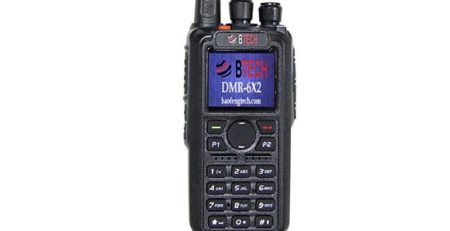
The base DMR-6X2 supports Analog APRS transmit and Digital APRS transmit/receive. DMR-6X2 PRO and DA-7X2 add Analog APRS receive/display capabilities. Exact CPS fields remain model-specific.
Compare models and required versions
| Model | Verified procedure | Required version | Important difference |
|---|---|---|---|
| DMR-6X2 | Analog APRS TX; Digital APRS TX/RX | Current model firmware/CPS | Analog APRS is transmit-only on this model; Digital APRS can transmit and receive. |
| DMR-6X2 PRO | Analog APRS TX/RX; Digital APRS TX/RX | Current PRO firmware/CPS | DMR-6X2 PRO provides integrated APRS receive filters, logs, and Bluetooth controls; DA-7X2 provides related functions through its own model-specific controls. |
| DA-7X2 | Analog APRS TX/RX; Digital APRS TX/RX | Current DA firmware/CPS | GNSS, fixed beacons, report channel/slot, and DA TOCALL fields. |
See what each APRS path needs
| Question | Analog APRS | Digital APRS |
|---|---|---|
| What leaves the radio? | An audio-frequency packet on analog FM | A DMR data/report transmission |
| What carries it? | Local RF receivers/digipeaters/igate path | DMR repeater or hotspot plus a compatible network route |
| What must be coordinated? | Frequency, bandwidth, path, callsign/SSID, symbol, timing, power | DMR channel, destination, call type, slot, Radio ID, report channel, network support |
| Can voice work while APRS fails? | Yes; APRS packet/timing/path can still be wrong | Yes; the DMR voice path can work while the data gateway or destination does not |
| Typical confirmation | Known local receiver, digipeater, igate, or suitable map/service | Radio send indication plus confirmed network/gateway/map result |
Choose an APRS path in three steps
-
Check the local RF APRS path
If local APRS stations/digipeaters use an authorized analog channel that your radio can reach, Analog APRS may work without a DMR network.
-
Check the DMR network path
If the repeater/hotspot and network explicitly support Digital APRS, collect the exact destination, call type, slot, and report-channel requirements.
-
Choose the path you can confirm from radio to destination
Program one path, send one controlled report, and confirm both radio behavior and the receiver/network result. Keep the other path off until you need and validate it.
Troubleshooting
| What happened | Likely reason | Next check |
|---|---|---|
| Analog APRS sends but never appears | Frequency/path/timing/GPS/receiver coverage issue | Confirm one local receiver or digipeater and validate the packet before changing interval or power. |
| Digital APRS sends but never appears | Network destination/call type/slot/gateway issue | Confirm the DMR channel and ask the network/repeater owner which data route is supported. |
| Both paths report too often | PTT and timed upload enabled on both systems | Disable the path/trigger you do not need and use a responsible interval. |
| Map shows the wrong place | Stale GPS or old fixed beacon | Obtain a fresh GPS fix or update the fixed coordinates before another report. |










Leave a Reply